



This guide is for small businesses choosing their first CRM, or replacing a spreadsheet of leads. We compare what each free plan includes, what the first paid tier costs, how pricing grows as you add people, and how much marketing machinery comes bundled in. Prices are in US dollars unless marked otherwise. If you are in Canada, the If you're in Canada section covers Canadian dollar pricing, sales tax, and a few local rules. If what you mostly need is newsletters and email automation rather than a sales pipeline, our best email marketing software for freelancers guide compares Kit, GetResponse, Brevo, AWeber, and Mailchimp.
How we evaluated
This is a research-based review. We did not use these products hands-on. We compared four CRMs using each vendor's pricing pages, plan feature lists, and official help documentation.
We scored each tool on:
- Free plan: whether there is one, and its user and contact limits
- First paid tier: regular list price, billed monthly and annually
- Scaling cost: per-seat pricing, flat pricing, onboarding fees, and usage charges
- Automation: which plan adds workflows and email sequences
- Fit: who the vendor designs and positions the product for
All prices are regular list prices checked in September 2026 and exclude sales tax. HubSpot was advertising a new-customer Starter discount when we checked; we note it separately and do not use it for comparison.
A note on currency: vendors serve pricing pages by location, and we saw different currencies depending on where a page was loaded from. HubSpot showed USD or Canadian dollars. Zoho's pricing page showed Indian rupees or Canadian dollars, so the Zoho USD figures below come from the USD price list that Zoho's pricing page loads. Pipedrive's pricing page only showed us Canadian dollars, so its USD figures come from Pipedrive's own comparison pages, which give the Lite and Ultimate prices only. GoHighLevel showed the same dollar prices in every check.
| Feature | HubSpot | Zoho CRM | Pipedrive | GoHighLevel |
|---|---|---|---|---|
| Free plan | 2 users, 1,000 contacts | 3 users | No (14-day trial) | No (14-day trial) |
| Cheapest paid plan, billed monthly | $20/seat | $20/user | Local currency (CA$34/seat in Canada) | $97 |
| Cheapest paid plan, billed annually | Promo only when checked | $14/user | $14/seat | $970/year |
| Pricing model | Per seat | Per user | Per seat | Flat monthly |
| Email sequences from | Sales Hub Professional | Not listed by plan | Growth | All plans |
| Best for | Growing teams | Value seekers | Sales pipelines | Marketing agencies |
1. HubSpot: best free CRM, best for growing teams
HubSpot's free CRM covers up to 2 users and 1,000 contacts, with no time limit. HubSpot lists contact management, deal pipelines, email tracking, email templates, live chat, a shared inbox, and a reporting dashboard among the free tools. That makes it the strongest free starting point of the four for a small team that wants a shared pipeline.
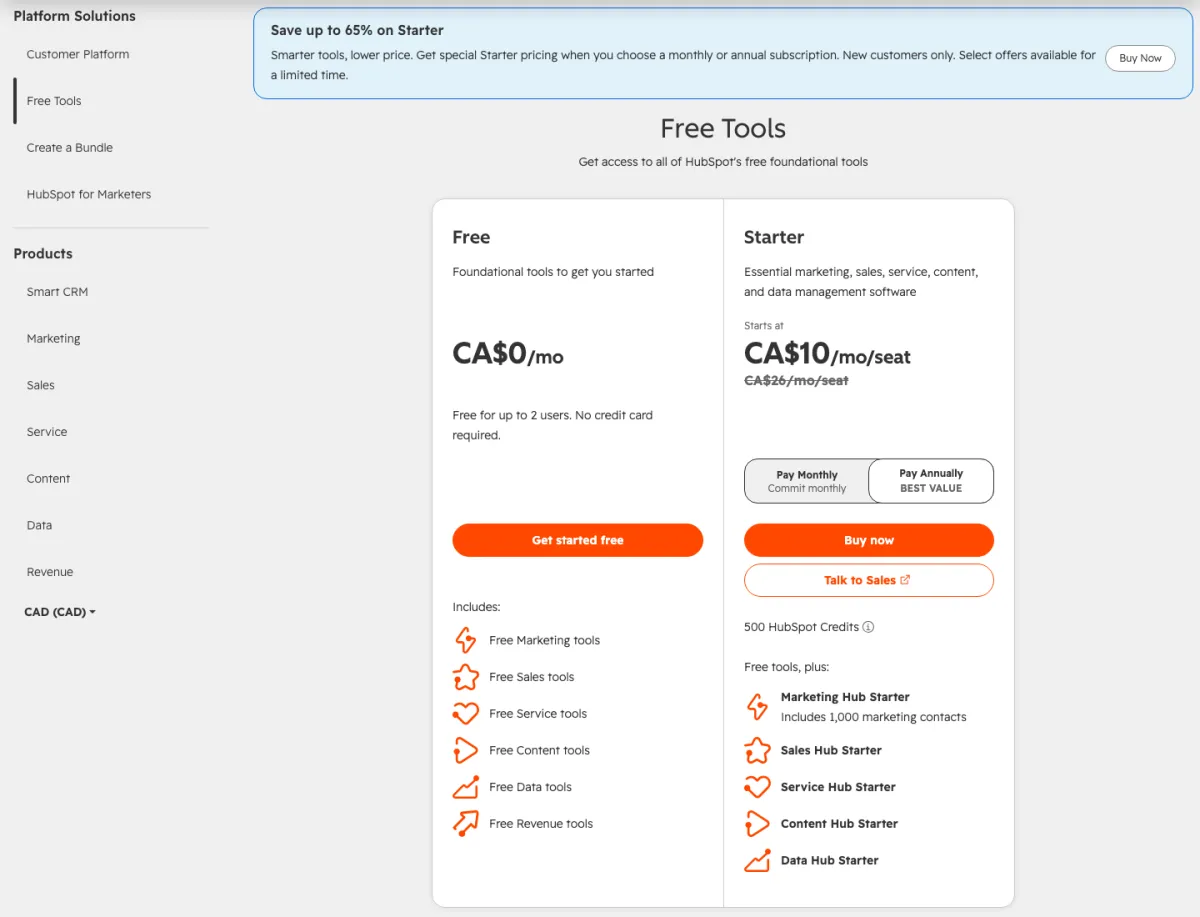
Paid tiers are priced per seat, and each tier steps up in price. The Starter Customer Platform has a regular price of $20 per seat per month and bundles the Starter editions of Marketing, Sales, Service, Content, and Data Hub, including 1,000 marketing contacts. When we checked, HubSpot was advertising Starter from $7 per seat per month for new customers under a limited-time "save up to 65%" offer. Sales Hub Professional is $100 per seat per month billed monthly, or $90 with an annual commitment, plus a required one-time onboarding fee of $1,500. HubSpot's Sales Hub pricing page does not list a seat minimum. Marketing Hub Professional is $890 per month billed monthly ($800 with an annual commitment) with 3 core seats and 2,000 marketing contacts included, plus a required $3,000 onboarding fee.
HubSpot's case is breadth: sales, marketing, service, and content tools in one system, and HubSpot says its free CRM connects to over 2,000 apps. Starting free and upgrading only the hub you need is a reasonable path, as long as you budget ahead for Professional pricing.
HubSpot
Strengths
- Free CRM for up to 2 users and 1,000 contacts, no time limit
- Sales, marketing, service, and content tools in one platform
- Over 2,000 app integrations, per HubSpot
- Local currency pricing in several countries
Good to know
- Sales Hub Professional is $100 per seat monthly plus $1,500 onboarding
- Marketing Hub Professional starts at $890 a month billed monthly
- Advertised Starter price is a limited-time offer for new customers
- Free plan includes up to 1,000 contacts
HubSpot
2. Zoho CRM: best value
Zoho CRM has a free edition for up to 3 users, the most generous free user count here. Zoho's pricing page lists contact management, follow-up reminders, workflow automation, custom email templates, tasks, meetings and calls, standard reports, data import and export, and mobile apps on the free edition.
Zoho's prices vary by region. In USD, Standard is $20 per user per month billed monthly ($14 billed annually), Professional is $35 ($23 annually), Enterprise is $50 ($40 annually), and Ultimate is $65 ($52 annually). Zoho says annual billing saves up to 34% and that local taxes are charged on top.
Zoho's pricing page carries two layouts, one marked for US visitors and one for other regions, and a browser in Canada was shown a different one on each of two days we checked. The version shown in Canada on September 29, 2026 lists four paid editions. On that page, Standard includes workflows and assignment rules, AI agents, cadences (automated follow-up sequences), reports and dashboards, sales forecasting, and self-service kiosks. Professional adds CPQ (configure, price, quote), email intelligence, process automation, widgets, inventory management, and a Google Ads integration. Enterprise adds an AI sales assistant, journey orchestration, territory management, custom functions, wizards, and customer portals. Ultimate adds higher feature limits, consulting, migration assistance, custom AI and machine learning, and data preparation.
The other layout, which a Canadian browser was served on September 28, shows only Standard, Professional, and Enterprise on its price cards and mentions Ultimate in its FAQ. It also groups features differently: it puts AI agents and customer portals on Professional, and lists mass email, built-in calling, and multiple pipelines under Standard and approval processes and a developer sandbox under Enterprise. Both layouts agree that CPQ, process automation, and inventory start on Professional and custom functions start on Enterprise. Before you buy, check Zoho's feature comparison for the specific feature you need.
On price alone, Zoho CRM is among the cheapest paid options here, tied with Pipedrive Lite at the entry level on annual billing, and workflow automation and follow-up reminders are included even on the free edition. There is a lot to choose from: four paid CRM editions, plus Bigin (Zoho's simpler pipeline CRM) and the Zoho CRM Plus bundle on the same pricing page, take time to compare. Zoho also sells accounting software; Zoho Books is covered in our best accounting software in Canada review.
Zoho CRM
Strengths
- Free edition for up to 3 users
- Standard from $14 per user per month billed annually
- Workflow automation and follow-up reminders on every edition
- Up to 34% off with annual billing
Good to know
- Several paid tiers, plus Bigin and CRM Plus, to compare before choosing
- Prices and the pricing page layout differ by region
- Process management and inventory start on Professional
- Custom functions and territory management start on Enterprise
Zoho CRM
3. Pipedrive: best pure sales pipeline
Pipedrive is a sales pipeline CRM with four plans: Lite, Growth, Premium, and Ultimate. Pipedrive's own comparison pages put them at $14 (Lite) to $79 (Ultimate) per seat per month billed annually in USD. Its pricing page shows prices in your local currency, and its help centre says your location determines your billing currency. Pipedrive says annual billing saves up to 44%, and every plan has a free 14-day trial with no credit card required. You are charged per seat, whether or not the seat is assigned to a user.
Lite covers lead, calendar, and pipeline management, AI-assisted report creation, and access to more than 500 integrations. Growth is the tier to budget for if you want follow-ups handled for you: it adds full email sync with open and click tracking, automations, and nurturing email sequences. Premium adds lead generation and routing, contracts with e-signatures, and custom scoring. Ultimate adds security rules, data enrichment, and a sandbox account.
Pipedrive focuses on sales rather than marketing. Email campaigns are a separate add-on, and it does not include a funnel builder. Many small businesses pair a pipeline CRM with a dedicated email tool; our email marketing guide compares Kit and four alternatives.
Pipedrive
Strengths
- Lite from $14 per seat per month billed annually
- Up to 44% off with annual billing
- Free 14-day trial, no credit card required
- More than 500 integrations
Good to know
- Paid plans only, with a 14-day free trial
- Automations and email sequences start on Growth
- Email campaigns and lead capture are add-ons or higher tiers
- Sales-focused, so pair it with an email tool for marketing
Pipedrive
4. GoHighLevel: best for marketing agencies managing clients
GoHighLevel (HighLevel) is a CRM bundled with a website and funnel builder, email and SMS marketing, calling, booking calendars, reputation management, courses, communities, payments, and workflow automation. Its pricing page lists Starter at $97 a month ($970 a year) with 3 sub-accounts, Unlimited at $297 a month ($2,970 a year) with unlimited sub-accounts, and Agency Pro at $497 a month ($4,970 a year), which adds SaaS Mode, automated sub-account creation, and the ability to rebill phone and email usage with a markup. There is also a custom Enterprise plan. Every plan includes unlimited contacts and users and starts with a 14-day free trial, and HighLevel says it runs month to month with no long-term contract.
We previously rated GoHighLevel 4.5, level with HubSpot, and pitched reselling it to clients. We lowered it to 3.5 because this guide is about small businesses buying a CRM for themselves. The platform is structured around sub-accounts, which HighLevel describes as client accounts for agencies. Plans are paid, so the entry cost is $97 a month. On top of the subscription, HighLevel says usage-based charges apply for phone numbers, SMS, email sends, and premium AI features. Several capabilities are paid add-ons, for example WhatsApp at $10 a month per sub-account and a white-label mobile app at $497 a month.
Where it fits is a marketing agency or freelancer running marketing for several client businesses. HighLevel positions Starter for smaller businesses and solo marketers, Unlimited for growing agencies, and Agency Pro for agencies that want to sell the platform as their own software. If that is your business model, one subscription can replace separate funnel, email, SMS, and booking tools across clients. If you simply need a pipeline for your own sales, HubSpot, Zoho CRM, or Pipedrive costs less to start.
GoHighLevel
Strengths
- Unlimited contacts and users on every plan
- CRM plus funnels, email, SMS, calendars, and courses in one subscription
- Unlimited and Agency Pro allow unlimited client sub-accounts
- Month to month, with a 14-day free trial
Good to know
- Paid plans from $97 a month
- Usage charges for phone, SMS, email, and AI apply on top of the plan
- Plans are built around agency sub-accounts
- Several features are paid add-ons per sub-account
How to choose a CRM
Start free if you can. HubSpot (2 users, 1,000 contacts) and Zoho CRM (3 users) both have free plans. Pipedrive and GoHighLevel offer 14-day trials instead.
Price the team you will have in a year. All three per-seat tools charge for each person you add. For five users billed annually, the entry tiers work out to about $70 a month on Zoho CRM Standard and $70 on Pipedrive Lite, while HubSpot's regular Starter price is $20 per seat, or $100 a month for five. Check the tier you actually need, since automation starts higher on Pipedrive (Growth) and HubSpot (sales sequences on Sales Hub Professional).
Budget for one-time and usage fees. HubSpot's Professional tiers carry required onboarding fees ($1,500 for Sales Hub, $3,000 for Marketing Hub). GoHighLevel adds usage charges for messaging and AI.
Check the currency and tax. Pricing pages change by location, so confirm the currency at checkout. Listed prices exclude sales tax, VAT, or GST, which are added based on where your business is.
Check how you get your data out. Zoho lists data import and export on every edition, and Pipedrive supports imports from spreadsheets and other CRMs. Confirm export options before you commit.
If you're in Canada
You can pay in Canadian dollars for three of the four. HubSpot, Pipedrive, and Zoho CRM all showed Canadian dollar prices to a browser in Canada in September 2026. GoHighLevel's pricing page shows dollar amounts with no currency label; HighLevel is based in Dallas, so plan on USD. When a Canadian card is charged in a foreign currency, the issuer converts the amount to Canadian dollars and then adds a conversion charge. The Financial Consumer Agency of Canada uses 2.5% as its example and says to check your card agreement for your rate.
Regular Canadian list prices when we checked:
- HubSpot: Starter Customer Platform CA$26 per seat per month (advertised from CA$10 billed annually or CA$13 billed monthly for new customers, limited time). Sales Hub Professional CA$130 per seat billed monthly or CA$117 with an annual commitment, plus a CA$1,950 onboarding fee. Marketing Hub Professional CA$1,150 a month billed monthly or CA$1,034 on an annual commitment, plus a CA$3,700 onboarding fee.
- Zoho CRM: Standard C$25 per user per month billed monthly (C$19 annually), Professional C$44 (C$31 annually), Enterprise C$63 (C$50 annually), and Ultimate C$81 (C$65 annually). Zoho's page served in Canada on September 29 showed all four paid editions; an earlier layout served on September 28 showed Ultimate only in its FAQ.
- Pipedrive: Lite CA$34 per seat per month billed monthly (CA$19 annually), Growth CA$69 (CA$49 annually), Premium CA$109 (CA$79 annually), and Ultimate CA$139 (CA$109 annually). The Campaigns email add-on starts from CA$13.33.
- GoHighLevel: no Canadian dollar pricing shown.
For five users billed annually, the entry tiers come to about C$95 a month on Zoho CRM Standard and CA$95 on Pipedrive Lite. Every CRM plan above is also in our software price index, which you can download as a CSV.
GST/HST is extra. All listed prices exclude sales tax. Our GST, HST, and PST rates by province guide covers what applies where, and the sales tax calculator works out the total.
Canadian data hosting. Zoho CRM runs a Canadian data centre (accounts.zohocloud.ca), and Zoho says your account's data centre is chosen from the country you sign up from. If you need customer data stored in Canada, confirm the hosting region with any vendor before you sign up.
Anti-spam rules apply to CRM email. Canada's Anti-Spam Legislation (CASL) requires consent before you send commercial electronic messages. If you use a CRM's email sequences or campaigns, record how and when each contact agreed to hear from you.
Our verdict
4.5Start with HubSpot's free CRM if you are building a team and want the broadest platform with no upfront cost, and budget ahead for Professional pricing when you move up. Choose Zoho CRM if price per user matters most, especially past two or three users. Pick Pipedrive if you want a focused sales pipeline and are happy to add a separate email tool. Choose GoHighLevel if you are an agency running marketing for several clients; for most small businesses buying a CRM for their own sales, the other three cost less to start.
Frequently asked questions
Do I need a CRM as a freelancer or tiny business?
Not always. A spreadsheet can work while you have a handful of prospects. A CRM starts to earn its place when you lose track of follow-ups or need to share a pipeline with someone else. HubSpot (2 users) and Zoho CRM (3 users) both have free plans, so you can try one without paying.
Which CRM is cheapest for a small team?
On regular list prices, Zoho CRM Standard and Pipedrive Lite both start at $14 per user or seat per month billed annually in USD, so five users cost about $70 a month on either. HubSpot's Starter Customer Platform lists at $20 per seat per month. Check which plan includes the features you need, because Pipedrive's automations start on Growth and HubSpot's sales sequences start on Sales Hub Professional.
What is the difference between GoHighLevel and a normal CRM?
GoHighLevel bundles a CRM and pipelines with funnels, websites, email and SMS marketing, booking calendars, courses, and workflow automation. Its plans are organized around sub-accounts, one per client business, and Agency Pro adds SaaS Mode for reselling the platform. It is built for agencies running marketing for several clients.
Can I migrate from one CRM to another later?
Usually, yes. Pipedrive says you can import data from a spreadsheet or another CRM, and Zoho lists data import and export on every edition, including the free one. Before you commit, check how each tool exports contacts and deals so you are not locked in.
Can Canadian businesses pay for these CRMs in Canadian dollars?
HubSpot, Pipedrive, and Zoho CRM showed Canadian dollar prices to Canadian visitors when we checked, and Pipedrive's help centre says your location determines your billing currency. GoHighLevel's page shows dollar prices with no currency label, and HighLevel is based in Dallas, so expect USD. Paying in USD with a Canadian card usually adds a foreign currency conversion charge set out in your card agreement.
Sources
- HubSpot Sales Hub pricing (checked September 2026)
- HubSpot free tools and Starter Customer Platform pricing (checked September 2026)
- HubSpot Marketing Hub pricing (checked September 2026)
- HubSpot free CRM features (checked September 2026)
- Zoho CRM pricing and editions (checked September 2026)
- Zoho CRM multi data centre support (checked September 2026)
- Pipedrive pricing plans (checked September 2026)
- Pipedrive vs HubSpot (USD plan range, checked September 2026)
- Pipedrive: How does pricing work in Pipedrive? (checked September 2026)
- Pipedrive: What features do the Pipedrive plans have? (checked September 2026)
- HighLevel pricing (checked September 2026)
- Financial Consumer Agency of Canada: How credit cards work (checked September 2026)
- Government of Canada: Canada's Anti-Spam Legislation (checked September 2026)