
Kit, formerly ConvertKit, is an email marketing tool built for people whose business is their audience: freelancers, consultants, coaches, writers and creators who sell expertise, digital products or a paid newsletter. Its free Newsletter plan covers up to 10,000 subscribers with unlimited sends, which is the largest free tier among the tools in our email marketing software guide, where Kit is our top pick.
This review covers what Kit costs, how its plans differ, what it charges when you sell, what it documents for anti-spam compliance, and how migrations and deliverability work. If you run your business from Canada, the If you're in Canada section covers CAD billing, GST/HST and CASL.
Disclosure: NorthVetted sends its own newsletter with Kit, and we may earn a commission if you sign up for Kit through our links. That is a disclosure, not a test. This review is based on Kit's published plans and help centre, not on our own use, and neither the commission nor our account affects the facts below.
How we evaluated
This is a research-based review. We did not use Kit hands-on. Every price, limit, fee and feature below comes from Kit's official pricing page, migrations page and help centre, checked in September 2026, together with official regulator guidance on anti-spam law and, for the Canada section, Scotiabank's published card fees.
We judged Kit on what matters to a freelancer or small creator business:
- Free plan: subscriber cap, sends, and what it leaves out
- Paid plans: list prices billed monthly and annually, and what each adds
- Commerce: transaction fees on products and paid newsletters, supported currencies and countries, and sales tax handling
- Anti-spam support: consent tools, required footer content and unsubscribe handling
- Migration and deliverability: what Kit documents for moving a list and authenticating your sending domain
We compared Kit with the alternatives using the figures in our email marketing software guide, checked in the same month.
Kit pricing
Kit has three plans: the free Newsletter plan, Creator and Pro. Paid plans are priced by the number of active subscribers, so the price rises as your list grows. Kit's billing article states that "your bill is based on your active subscribers, not on emails sent or features used."
| Feature | Newsletter (free) | Creator | Pro |
|---|---|---|---|
| Price billed monthly (1,000 subscribers) | $0 | $39/mo | $79/mo |
| Price billed annually (1,000 subscribers) | $0 | $390/yr (about $33/mo) | $790/yr (about $66/mo) |
| Subscriber limit | Up to 10,000 | Priced by list size | Priced by list size |
| Email sends | Unlimited | Unlimited | Unlimited |
| Visual automations and sequences | 1 basic automation with 1 sequence | Unlimited | Unlimited |
| Team members | 1 | 2 | Unlimited |
| Digital products and paid newsletters | |||
| Transaction fee on sales (USD) | 3.5% + 30¢ | 3.5% + 30¢ | 3.5% + 30¢ |
| Free migration | |||
| Advanced deliverability reporting |
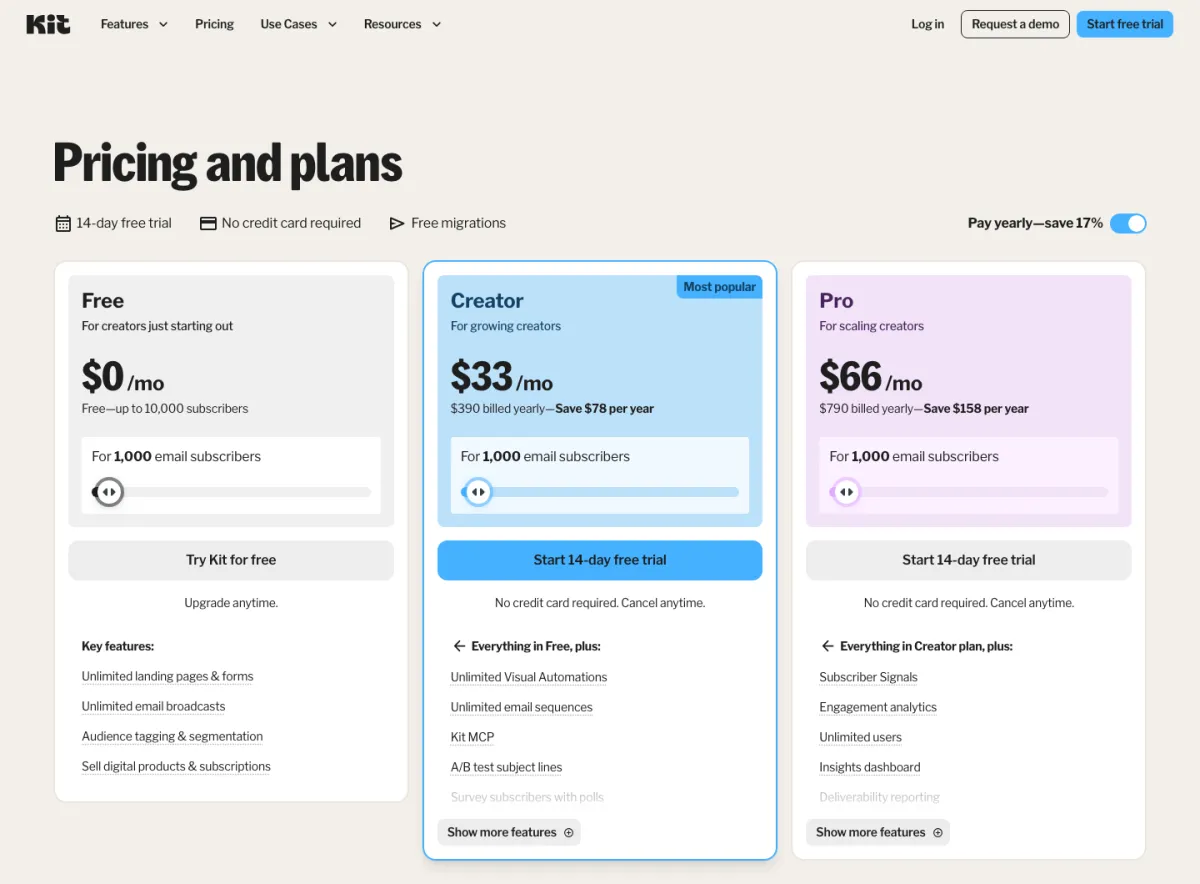
Kit's help centre lists Creator from $39/month and Pro from $79/month for up to 1,000 subscribers. Its pricing page defaults to annual billing, which it describes as saving 17%, and shows $390 a year for Creator (about $33 a month, "Save $78 per year") and $790 a year for Pro (about $66 a month, "Save $158 per year"). Kit's billing article puts it another way: annual plans give "12 months for the price of 10." Both paid plans have a 14-day free trial with no credit card required, and Kit's billing article describes a 30-day refund window on all payments, including annual plans.
Which currency? Kit's pricing page shows dollar prices with no currency label and no currency selector, and the worked examples in Kit's billing article refer to US state sales tax. We treat Kit's list prices as US dollars; check your invoice to confirm what you are charged in.
Kit's pricing page shows the 1,000-subscriber tier by default, so check the tier that matches your list. Upgrades happen automatically when your active subscriber count passes your tier, with a pro-rated adjustment on your next bill; downgrades are manual. Kit's billing article asks customers outside the US to add a tax ID, such as a VAT number, for accurate invoicing.
What the free Newsletter plan includes
Kit's free plan is generous on list size and sends, and narrow on automation. According to Kit's help centre, the Newsletter plan includes:
- Up to 10,000 active, unique subscribers
- Unlimited email sends
- Unlimited forms and landing pages
- Unlimited digital products and subscriptions (paid newsletters)
- A newsletter feed and mini-website for your issues
- A/B testing and conditional email content
- One basic visual automation with one email sequence
- Recommendations, with five slots to recommend other creators
- Support, with Kit aiming to answer free-plan requests within 24 to 72 hours
- List import
What starts on paid plans: more than one visual automation or sequence, advanced automation features such as Rules and Integrations, RSS campaigns, paid recommendations, and some apps in Kit's App Store, which show "Upgrade to install" on the free plan. The "Built with Kit" badge also stays on free-plan product pages.
For a freelancer, the free plan covers a regular newsletter and one welcome sequence. Separate sequences, for example one per lead magnet, need Creator.
What Creator and Pro add
Creator ($39/month billed monthly at 1,000 subscribers) adds, according to Kit's pricing page, unlimited visual automations and unlimited email sequences, subject line A/B tests, polls to survey subscribers, removal of Kit branding, SMS marketing, apps and integrations, RSS campaigns that turn new blog posts into emails, Kit MCP, 24/7 email and chat support, and a second team member. It also unlocks free migration from another platform.
Pro ($79/month billed monthly at 1,000 subscribers) adds, according to Kit's pricing page and plan comparison, unlimited team members, subscriber engagement scoring and engagement analytics, Subscriber Signals and an insights dashboard, advanced deliverability reporting by email provider and segment, advanced A/B testing (up to five subject line variants plus email content tests), collaborative editing, editing links in sent broadcasts, Facebook Custom Audiences sync, a newsletter referral system (SparkLoop), and 24/7 priority email and chat support.
For most solo freelancers, Creator is the relevant upgrade. Pro is aimed at creators with a team, a larger list, or a newsletter that grows through referrals.
Kit lists SMS marketing on its paid plans, but its pricing page does not say which countries SMS covers. Text messages are also covered by anti-spam rules in several places, so confirm both coverage and the rules where your subscribers live before planning an SMS campaign.
Selling digital products and paid newsletters
Kit includes a commerce feature on every plan, including the free one, with no monthly fee. You can sell digital products such as e-books, courses, templates, presets and music, sell access to a link such as a members-only page, and run a paid newsletter as a subscription. Kit fulfils digital products only.
| Feature | Kit Commerce |
|---|---|
| Transaction fee (USD, CAD, AUD or NZD pricing) | 3.5% + 30¢ |
| Transaction fee (GBP / EUR pricing) | 3.5% + £0.20 / 3.5% + €0.25 |
| Monthly fee | $0 |
| Plans that include it | All, including free |
| Payment processor | Stripe only (new Stripe account created at setup) |
| Seller countries | 39, including the US, UK, Canada, Australia and most of the EU |
| Payouts | Weekly on Fridays; first payout 7 to 14 days after first sale |
| Fee refunded when you refund a buyer | |
| Taxes collected for you | VAT only |
Kit's help centre lists 39 countries you can sell from, including the United States, United Kingdom, Canada, Australia, New Zealand, Japan, Singapore, Hong Kong, Switzerland, Norway and most EU countries. Each product is priced in one of six currencies (USD, EUR, GBP, CAD, AUD or NZD), you are paid in your bank account's currency, and Kit says a product's currency cannot be changed after you create it, so pick the currency your buyers expect before you publish.
What 3.5% + 30¢ costs on typical prices:
| Feature | Kit fee (3.5% + 30¢) | You keep |
|---|---|---|
| $8/month paid newsletter | $0.58 | $7.42 |
| $25 template or e-book | $1.18 | $23.82 |
| $80/year paid newsletter | $3.10 | $76.90 |
| $300 course | $10.80 | $289.20 |
The fixed 30¢ makes the fee a larger share of small monthly charges: 7.25% of an $8 monthly subscription, compared with 3.875% of an $80 annual one. If you run a paid newsletter, an annual price option reduces how often the 30¢ applies.
For paid newsletters, Kit describes a subscription product with monthly, quarterly or yearly billing. You send paid-only issues by filtering a broadcast to people "subscribed to" your newsletter product, and Kit says anyone who cancels is automatically excluded.
Sales tax and VAT on your Kit sales
Kit's help centre is direct about tax: "Kit collects Value-Added Tax (VAT) only. Other taxes, including US sales tax and Canada QST, aren't charged or collected for you." Kit can calculate VAT once you enable VAT collection and set product tax codes, and it provides a VAT report. Any other sales tax you owe on digital products, such as US state sales tax, is yours to charge and remit. Ask a tax adviser how the rules for digital products apply where you and your buyers are.
If selling is the core of your business rather than an add-on to your newsletter, a dedicated store may fit better. See our Shopify review and Shopify fees guide.
Anti-spam rules: what Kit documents and what you handle
Anti-spam law depends on where your subscribers are, and the main regimes differ on consent:
- United States (CAN-SPAM): the FTC's guide says the law does not require prior consent for commercial email, but each message needs your valid physical postal address and a clear way to opt out, and opt-out requests must be honoured within 10 business days. The FTC lists penalties of up to $53,088 per violating email.
- United Kingdom (PECR): the ICO says you must not send marketing emails to individuals unless they have specifically consented, with a limited "soft opt-in" for recent customers who were given a clear chance to opt out when their details were collected and in every message. Rules for emailing companies are looser, but sole traders count as individuals.
- European Union (GDPR and the ePrivacy Directive): the European Commission says email marketing must comply with both, including article 13 of the ePrivacy Directive on direct marketing, and that people have the right to object to their data being used for direct marketing.
- Canada (CASL): consent is required and time-limited when implied. See If you're in Canada.
Kit does not describe its features in terms of any one country's law. Its help articles cite the US CAN-SPAM Act for the address rule and otherwise refer to "anti-spam laws" in general. Here is what Kit documents, and what you handle yourself:
| Feature | What Kit documents | What you still need to do |
|---|---|---|
| Consent | Double opt-in is the default for forms: subscribers click a button in a confirmation email to confirm | Keep double opt-in on, and write form copy that asks clearly for consent to marketing emails |
| Imported lists | Imported subscribers are confirmed automatically, even on double opt-in forms | Import only people who gave you permission, and keep your own proof of that consent |
| Identification | Every email must include a physical postal address; Kit offers its Seattle address as an option | Use an address where you can actually receive mail if your local law requires contact details |
| Unsubscribe | An unsubscribe link is needed to comply with anti-spam laws, and one-click unsubscribes are honoured immediately | Do not remove the unsubscribe link from custom templates |
Double opt-in. Kit's help centre calls double opt-in "the default setting in Kit": a new subscriber must click to confirm in a confirmation email. A confirmed click can help show that a subscriber asked to join, but in consent-based regimes the onus is on you to keep proof.
Imported subscribers. This is the main step to plan for. Kit's import article says subscribers imported into a form "will be automatically confirmed on that form, even if it has double opt-in enabled," and that knowing someone personally or having them in your address book "isn't enough" permission.
Physical address. Kit requires a physical postal address in every email, citing the CAN-SPAM Act. It suggests options such as a P.O. box or co-working space, and offers its own Seattle address while noting that Kit "will not monitor the mailing address on your behalf." Some laws, including CASL, ask for your own current contact details, so use an address where you can be reached.
Unsubscribe. Kit's help centre says you need an unsubscribe link in your emails "to comply with anti-spam laws," and Kit adds one-click unsubscribe headers to every send. Kit says unsubscribes made this way are "honored immediately," well within the 10-business-day limits in CAN-SPAM and CASL.
This is general information, not legal advice. If your list-building involves contests, purchased data or third-party referrals, get advice specific to the laws where your subscribers live.
Migrating to Kit
Kit's help centre says it will move your email setup to Kit for free if you sign up for a paid plan, and its migrations page says "Migration is included with every paid Kit plan." The migrations page splits this in two:
- Essentials migration, for lists under 10,000 subscribers: subscribers, tags, lists and segments, in 2 to 5 business days
- Concierge migration, for 10,000 or more subscribers: adds forms, automation emails, email templates and integrations, with timing that varies per request
On the free plan, you import subscribers yourself from a CSV and map the fields. Kit's help centre has platform-specific switching guides for tools including Mailchimp, MailerLite, ActiveCampaign, beehiiv, GetResponse, Flodesk, Substack, Drip, Keap and AWeber.
Kit's deliverability guidance for switching: import only subscribers who gave clear consent and have been engaged in the last 12 months, import past unsubscribes, bounces and spam complaints tagged as a "Suppression List" so Kit support can cancel them in bulk, and ramp up by sending to your most engaged subscribers first. Because imported subscribers skip double opt-in, a migration is also the moment to check your consent records.
Deliverability features Kit documents
We do not measure or rate inbox placement, and we make no claim about Kit's sending reputation. Here is what Kit documents for helping your emails get delivered:
- Verified sending domain. Kit lets you add SPF, DKIM and DMARC records for your own domain, which puts your from-address in the return-path and lets Kit messages pass DMARC. Kit's deliverability article says that if your domain has a DMARC record, you need a verified sending domain for Kit emails to pass DMARC.
- Double opt-in and reCAPTCHA on forms, which Kit recommends to protect against listbombing (fake sign-ups).
- One-click unsubscribe headers on every send.
- Suppression list tagging when you import past unsubscribes, bounces and complaints.
- Advanced deliverability reporting by email provider and segment, and subscriber engagement scoring, on Pro only.
If you're in Canada
Kit works for Canadian businesses, and Kit's help centre lists Canada among the countries you can sell from. Four things differ from the picture above.
Paying for Kit in CAD. Kit lists no CAD option for its subscription. Many Canadian cards add a fee when a charge is converted from a foreign currency. Scotiabank's fee page, for example, lists a foreign currency conversion fee of 2.5% of the converted amount on most of its cards. On a card with that fee, the conversion fee adds about $0.98 to a $39 Creator month and about $9.75 to a $390 annual Creator plan, on top of the exchange rate itself. Check your own card agreement, and consider annual billing if you want one conversion a year instead of twelve. If you would rather pay a set CAD price, our email marketing guide found Brevo was the only tool it compared that lists set CAD prices.
GST/HST on your Kit bill. Kit's billing article mentions US state sales tax and asks customers outside the US to add a tax ID such as a VAT number. It does not mention GST/HST. If you are registered for GST/HST, keep Kit's invoices and ask your accountant whether any tax shown on them can be claimed as an input tax credit. Your Kit subscription is generally a deductible business expense.
GST/HST on your sales. You can price products in CAD, at the same 3.5% + 30¢ fee as USD. Kit does not charge GST/HST, PST or QST to your Canadian buyers on your behalf. If you are a small supplier under the $30,000 threshold, you may not need to register; once you are registered, you are responsible for charging the right rate and remitting it. See how to register for GST/HST and GST/HST/PST rates by province, and ask an accountant how the rules for digital products apply, particularly to buyers in Quebec or outside Canada. If you are weighing a full store instead, see how to start an online store in Canada and Shopify vs WooCommerce in Canada.
CASL. If you send commercial emails to people in Canada, CASL applies. Government of Canada guidance says you need express or implied consent and must be ready to prove it; must identify yourself with your business name, a current mailing address and a phone number, email or website; and must include an unsubscribe mechanism, with every request actioned within 10 business days at no cost. Implied consent is time-limited: generally up to two years after the last interaction in an existing business relationship, and about six months after an inquiry. Kit's double opt-in, required footer address and immediate one-click unsubscribes line up with those rules, but imported subscribers are confirmed automatically, so if you bring over a list of past clients, check that their implied consent is still within its time limit before you import them.
What we like and what to know
Kit's strengths are the size of its free plan, unlimited sends on every plan, and commerce tools built in at no monthly cost. Keep in mind that the fixed 30¢ per sale is a larger share of small subscriptions, that you handle sales tax other than VAT yourself, and that imported subscribers are confirmed automatically.
Kit
Strengths
- Free plan for up to 10,000 subscribers with unlimited sends
- Unlimited forms and landing pages on every plan
- Digital products and paid newsletters on every plan, in six currencies
- Double opt-in by default and one-click unsubscribes honoured immediately
- Free migration on paid plans, including forms and automations for lists of 10,000+
- Verified sending domain with SPF, DKIM and DMARC documented
Good to know
- Prices are shown without a currency label (treated as USD), with no local-currency billing option
- Free plan includes one basic automation and one sequence; Creator adds unlimited
- Sales fee of 3.5% + 30¢, which Kit keeps if you refund a buyer
- Collects VAT; you charge and remit other sales taxes yourself
- Imported subscribers are confirmed automatically, so keep your own consent records
- Deliverability reporting and engagement scoring are included on Pro
Who Kit is for (and when another tool fits better)
Kit fits people who want to grow an audience with a newsletter and, often, sell something to it.
Kit is a good fit if you:
- Are a freelancer, consultant or coach building a newsletter to win clients, and want to start free with a list of up to 10,000
- Want to sell templates, e-books, a course or a paid newsletter without a separate store or monthly commerce fee
- Plan to grow into several automated sequences, for example lead magnets that feed different offers
- Are moving an existing list and want Kit's team to handle the migration on a paid plan
Another tool may fit better if you:
- Have a large list you email rarely: Brevo prices by emails sent rather than subscribers
- Want webinars and a course builder bundled with email: GetResponse's Creator plan includes both
- Sell physical products or run a full store: a dedicated e-commerce platform fits better
- Mainly need to track leads and deals: see the best CRMs for small businesses
Alternatives
Our best email marketing software for freelancers guide compares Kit with four alternatives on free plans, first paid plans, automation and currency:
- GetResponse: unlimited sends on every paid plan, with Starter at USD $19/month billed monthly and one custom automation workflow until Marketer at USD $59/month. Its Creator plan adds webinars, a website builder and a course creator.
- Brevo: priced by emails sent, with a free plan of up to 300 emails a day and Starter from USD $9/month for 5,000 emails a month.
- Mailchimp: a free plan of 250 contacts and 500 sends a month. A natural fit if your list and automations already live there.
- AWeber: a free plan for up to 500 subscribers, and Lite from USD $15/month with three automations, with 24/7 support listed on all plans.
Our verdict
4.5Kit is our top pick for freelancers and creators building an email list. Its free plan covers up to 10,000 subscribers with unlimited sends, one automated sequence and built-in selling, and Creator at $39/month (or $390 a year) at 1,000 subscribers adds unlimited automations and sequences. It rates 4.5 rather than 5 because the 3.5% + 30¢ commerce fee is a larger share of small monthly subscriptions, Kit collects VAT but no other sales tax on your sales, and imported subscribers are confirmed without double opt-in. Keep double opt-in on and keep consent records for anything you import, and Kit covers the anti-spam basics of unsubscribes and footer details. Canadian businesses should also budget for a possible card conversion fee and handle GST/HST themselves.
Frequently asked questions
Is Kit free?
Yes. Kit's Newsletter plan costs $0 for up to 10,000 active subscribers and includes unlimited email sends, unlimited forms and landing pages, digital products and paid subscriptions, and one basic visual automation with one email sequence. You pay only transaction fees if you sell through Kit.
How much does Kit cost?
Kit's help centre lists Creator from $39 a month and Pro from $79 a month for up to 1,000 subscribers, with prices rising as your list grows. Billed annually, Kit's pricing page shows $390 a year for Creator and $790 a year for Pro at that tier. Kit shows no currency label; its billing help uses US sales tax in its examples, so treat the prices as US dollars.
How much does Kit charge to sell digital products or a paid newsletter?
Kit charges 3.5% + 30¢ per transaction for products priced in USD, CAD, AUD or NZD, 3.5% + £0.20 in GBP and 3.5% + €0.25 in EUR, on every plan including the free one, with no monthly commerce fee. Payments run through Stripe, payouts go out weekly on Fridays, and processing fees are not refunded if you refund a buyer.
Does Kit collect sales tax or VAT on my product sales?
Kit collects VAT only. Its help centre says other taxes, including US sales tax and Canada's QST, are not charged or collected for you, so if you owe sales tax on your digital sales outside VAT, you charge and remit it yourself.
Will Kit move my list from Mailchimp or another tool for free?
Kit says migration is included with every paid plan. Its migrations page lists an Essentials migration (subscribers, tags, lists and segments) for lists under 10,000 subscribers and a Concierge migration that adds forms, automation emails, email templates and integrations for 10,000 or more. On the free plan, you import a CSV yourself.
Is Kit a good choice for a business in Canada?
It can be, with three things to plan for. Kit shows no CAD option for its subscription, so a Canadian card may add a foreign currency conversion fee; Kit does not collect GST/HST, PST or QST on your product sales; and Kit's tools cover CASL's unsubscribe and footer basics, but you must keep your own proof of consent, especially for imported lists.
Sources
- Kit pricing (checked September 2026)
- Kit: Free migrations (checked September 2026)
- Kit Help Center: The Kit Newsletter Plan (checked September 2026)
- Kit Help Center: Creator vs Pro, choose the right plan (checked September 2026)
- Kit Help Center: Billing at Kit (checked September 2026)
- Kit Help Center: Sell digital products with Kit, overview and FAQs (checked September 2026)
- Kit Help Center: Sell your products in different currencies (checked September 2026)
- Kit Help Center: Creating a paid newsletter (checked September 2026)
- Kit Help Center: The all-important double opt-in (checked September 2026)
- Kit Help Center: Importing subscribers into Kit, what to know and FAQs (checked September 2026)
- Kit Help Center: Alternatives for your physical address (checked September 2026)
- Kit Help Center: Gmail's one-click unsubscribe (checked September 2026)
- Kit Help Center: How to customize your unsubscribe text (checked September 2026)
- Kit Help Center: Migrating to Kit from another platform (checked September 2026)
- Kit Help Center: Getting started with deliverability success (checked September 2026)
- Kit Help Center: Verify your domain to optimize your deliverability (checked September 2026)
- Kit Help Center: Apps and integrations overview (checked September 2026)
- US Federal Trade Commission: CAN-SPAM Act compliance guide for business (checked September 2026)
- UK Information Commissioner's Office: Electronic mail marketing under PECR (checked September 2026)
- European Commission: Can data received from a third party be used for marketing? (checked September 2026)
- Government of Canada: Getting consent to send email (CASL) (checked September 2026)
- Scotiabank: Credit card fees (checked September 2026)