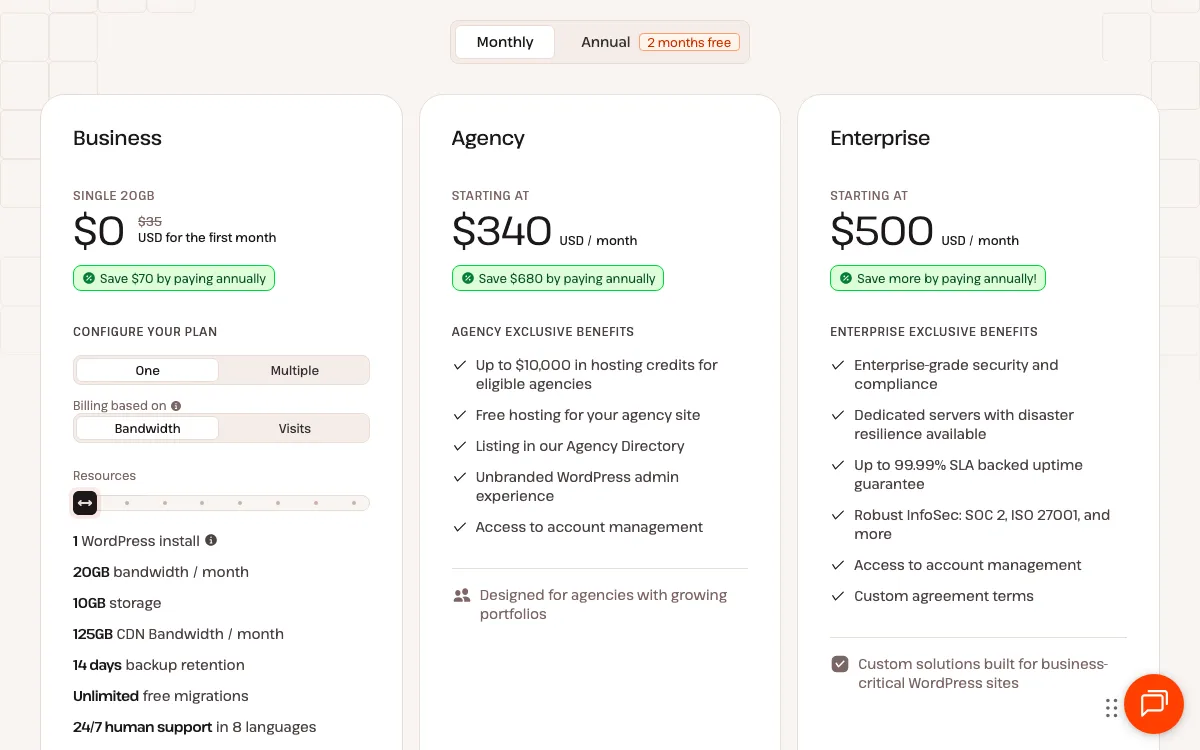
Kinsta's prices are simple at the entry level: USD $35 a month, or $350 a year, for one managed WordPress site. Past that, the bill depends on how many sites you run, how much traffic they get, which add-ons you choose and whether you pay monthly or yearly. This guide lists every Kinsta WordPress plan with its price and limits, what each plan includes, what costs extra, and how to pick a plan for your traffic, with worked examples.
All prices are in US dollars and exclude tax, as Kinsta lists them. For our overall take on the host, read our Kinsta review. If you are comparing hosts, see Cloudways vs Kinsta and Kinsta vs WP Engine. The If you're in Canada section covers Canadian data centres, US-dollar billing and sales tax.
The short answer
- One small site: $35 a month or $350 a year (Single 35k, Single 20GB or Launch). New customers get the first month free.
- One store or busier site: Launch at $35 a month, Single 65k or Single 40GB at $50, or Launch Plus at $59. Kinsta recommends these for ecommerce and membership sites.
- Two sites: Build at $69 a month or WP 2 at $70, or add a second site to a single-site plan for $30 a month.
- Annual billing on any plan costs 10 times the monthly price, so you pay for 10 months and get 12.
- Over your limits, sites stay online and Kinsta bills overages, from $0.50 per 1,000 visits.
How we researched this
This is a research-based guide. We did not host a site with Kinsta or receive a Kinsta bill. Every price, limit and policy below comes from Kinsta's pricing page, add-ons page and billing documentation, checked on October 19, 2026, and listed under Sources. The worked examples are our own arithmetic from those published prices. They are estimates, not quotes.
Kinsta's plan lineups
Kinsta currently sells two lineups of WordPress plans, and its pricing page may show you either one. Both start at the same price.
- Single and WP plans. You choose whether the plan is billed on visits (for example, 35,000 a month) or on server bandwidth (for example, 20GB a month). Single plans host one site; WP plans host two or more.
- Launch-family plans (Launch, Launch Plus, Build, Expand, Scale and Lead). Kinsta's plan guide calls these its new plans and says they are priced on server bandwidth only. The pricing page shows an estimated number of monthly visits for each, as a guide rather than a limit.
Kinsta counts a visit as each unique IP address seen within a 24-hour period, and it filters out well-known, clearly identified bots. Server bandwidth is the data your origin server sends each month; traffic served from the CDN or edge cache does not count toward it.
Single-site plans (visits or bandwidth)
Each row is one price with two billing options: the visits version and the bandwidth version have the same price, storage and CDN allowance.
| Plan (visits / bandwidth) | Monthly | Annual | Monthly allowance | Storage | CDN bandwidth | Backups kept | Recommended for ecommerce |
|---|---|---|---|---|---|---|---|
| Single 35k / Single 20GB | $35 | $350 | 35,000 visits or 20GB | 10GB | 125GB | 14 days | No |
| Single 65k / Single 40GB | $50 | $500 | 65,000 visits or 40GB | 10GB | 250GB | 14 days | Yes |
| Single 125k / Single 65GB | $90 | $900 | 125,000 visits or 65GB | 10GB | 500GB | 14 days | Yes |
| Single 315k / Single 125GB | $170 | $1,700 | 315,000 visits or 125GB | 10GB | 750GB | 14 days | Yes |
| Single 500k / Single 250GB | $290 | $2,900 | 500,000 visits or 250GB | 15GB | 1,000GB | 20 days | Yes |
| Single 750k / Single 500GB | $375 | $3,750 | 750,000 visits or 500GB | 15GB | 1,500GB | 20 days (750k) or 30 days (500GB) | Yes |
Kinsta's single-site table continues with an Enterprise tier from $625 a month ($6,250 a year) for 1.25 million visits or 750GB and up.
Launch-family plans (bandwidth only)
| Plan | Monthly | Annual | Sites | Server bandwidth | Estimated visits | Storage | CDN bandwidth |
|---|---|---|---|---|---|---|---|
| Launch | $35 | $350 | 1 | 15GB | 75,000 | 15GB | 125GB |
| Launch Plus | $59 | $590 | 1 | 25GB | 125,000 | 25GB | 250GB |
| Build | $69 | $690 | 2 | 40GB | 200,000 | 30GB | 250GB |
| Expand | $99 | $990 | 5 | 65GB | 350,000 | 40GB | 500GB |
| Scale | $169 | $1,690 | 10 | 125GB | 650,000 | 50GB | 750GB |
| Lead | $299 | $2,990 | 20 | 275GB | 1,500,000 | 60GB | 1,000GB |
All six keep backups for 14 days, and Kinsta marks all six as recommended for ecommerce and membership sites.
Multiple-site plans (visits or bandwidth)
| Plan | Monthly | Annual | Sites | Monthly allowance | Storage | CDN bandwidth | Backups kept | Recommended for ecommerce |
|---|---|---|---|---|---|---|---|---|
| WP 2 | $70 | $700 | 2 | 70,000 visits or 40GB | 20GB | 250GB | 14 days | No |
| WP 5 | $115 | $1,150 | 5 | 125,000 visits or 65GB | 30GB | 500GB | 14 days | Yes |
| WP 10 | $225 | $2,250 | 10 | 315,000 visits or 125GB | 40GB | 750GB | 14 days | Yes |
| WP 20 | $340 | $3,400 | 20 | 500,000 visits or 250GB | 50GB | 1,000GB | 20 days | Yes |
| WP 40 | $450 | $4,500 | 40 | 750,000 visits or 500GB | 60GB | 1,500GB | 20 days | Yes |
Above WP 40, Kinsta lists Enterprise plans for 60 or more sites from $675 a month ($6,750 a year). Its Agency plans start at $340 a month ($3,400 a year) and add agency benefits such as hosting credits and an unbranded WordPress admin; its Enterprise plans start at $500 a month and add options such as dedicated servers and custom agreement terms.
Multisite. WordPress multisite is supported on every plan except Single 35k and Single 20GB, according to Kinsta's plans documentation; its pricing table also lists Launch without multisite and Launch Plus and up with it.
What every plan includes
Kinsta lists these on all WordPress plans, at no extra charge:
- Kinsta CDN and edge caching, both powered by Cloudflare. Edge caching serves cached pages from Cloudflare's network of 300+ data centres.
- Security: a managed web application firewall with DDoS protection, free SSL certificates with wildcard support, bot protection, and vulnerability protection powered by Patchstack.
- Free malware removal for as long as you host with Kinsta.
- Unlimited free migrations handled by Kinsta's team.
- A free staging environment for every site.
- Daily automatic backups, kept 14 to 30 days depending on the plan.
- Tools: a built-in APM (application performance monitoring) tool, continuous MySQL database optimization, unlimited users with access levels, SAML single sign-on, and the Kinsta API.
- 24/7 support by chat in 8 languages, and an uptime SLA of up to 99.99%.
Some plans add site cloning, site transfers to another Kinsta company, or an account manager. The plan tables on Kinsta's pricing page show which tier includes each.
What costs extra
Add-ons
Kinsta's add-ons page lists these prices in USD:
| Add-on | Price | Notes |
|---|---|---|
| Extra WordPress site | $30/mo per site | Includes staging and a DNS zone; shares the plan's allowances |
| Disk space | $20/mo per 20GB | Shared by all sites on the plan |
| Premium staging environment | $20/mo per environment | Up to 5 per site; same PHP threads as the live site, CDN available |
| Backups every 6 hours | $20/mo per site | Daily backups continue as well |
| Hourly backups | $100/mo per site | Daily backups continue as well |
| External backups to Amazon S3 or Google Cloud Storage | $2/mo per site, plus $1/GB | Weekly or monthly |
| Redis caching | $100/mo per site | A dedicated 2GB Redis instance |
| Nginx reverse proxy | $50/mo per site | Kinsta support sets it up |
| PHP performance | $10/mo per 500MB | More PHP memory and threads |
| Kinsta Automatic Updates | $3/mo per environment | Plugin and theme updates with visual checks; 31-day free trial |
| Dedicated server | From $300/mo | Custom setups for high-traffic sites |
Kinsta also offers an expedited migration for $49 per site, alongside its free standard migrations. Add-ons such as premium staging are prorated in the month you add them, and Kinsta's add-ons FAQ says they are billed monthly even on an annual plan unless you ask for annual billing.
Overages
Each plan includes a monthly allowance of visits or server bandwidth, plus storage and CDN bandwidth. If your sites use more, Kinsta keeps them online and bills the difference:
| Resource | Overage rate |
|---|---|
| Visits | $0.50 per 1,000 visits |
| Server bandwidth | $0.50 per GB |
| CDN bandwidth | $0.05 per GB |
| Disk space | $2 per GB per month, prorated daily |
Plan limit alerts are on by default. Kinsta emails you at 80% and 100% of your plan's usage, and again at 10% over for visits. Bandwidth overages are charged at the end of each month; an overage of more than 250GB of server bandwidth is charged at the end of the first week after it happens. If an overage reaches the plan's own price or $500, whichever is less, Kinsta's policy says it may ask for payment sooner or for an upgrade to a suitable plan.
Unused allowances do not roll over to the next month.
Monthly vs annual billing
Kinsta charges 10 times the monthly price for a year, which it describes as 2 months free. You pay the year up front, and it renews at the same list price.
| Plan | 12 months billed monthly | Billed annually | Annual saving |
|---|---|---|---|
| Single 35k, Single 20GB or Launch | $420 | $350 | $70 |
| Single 65k or Single 40GB | $600 | $500 | $100 |
| Launch Plus | $708 | $590 | $118 |
| Build | $828 | $690 | $138 |
| WP 2 | $840 | $700 | $140 |
The monthly totals are 12 times the monthly price (our arithmetic). The free first month applies on both billing cycles for eligible plans: on monthly billing, a new customer's first year on a $35 plan costs $385 (11 paid months), and on annual billing you pay $0 at signup and $350 after the first month.
Annual billing suits a site you plan to keep on the same plan for the year. Monthly billing keeps your commitment to one month at a time. You can switch between them in MyKinsta, Kinsta's dashboard, and the change is prorated.
How to pick a plan by traffic
Start with two numbers: how many WordPress sites you need, and how much traffic they get. If you already have a site, Kinsta's plan guide suggests looking at the last two months of visits and bandwidth. Then check whether the site is a store, membership or course site, because Kinsta recommends those run on plans with 4 or more PHP threads, which its pricing table marks as recommended for ecommerce.
These examples use Kinsta's published prices and overage rates. They exclude tax.
A service business site with about 20,000 visits a month. Single 35k fits with room to spare: $35 a month or $350 a year. If your analytics show modest bandwidth, Single 20GB is the same price on bandwidth billing. Launch is also $35 and adds more storage (15GB instead of 10GB).
A WooCommerce store with about 50,000 visits a month. Kinsta recommends ecommerce-ready plans, so the starting points are Launch at $35 a month (about 75,000 visits by Kinsta's estimate) or Single 65k at $50 a month (65,000 visits). If the store has many product images, compare storage too: Launch includes 15GB and Single 65k 10GB.
A site that grows past its plan. A Single 35k site that gets 45,000 visits in a month has 10,000 extra visits, which is $5 in overage, so the month costs $40. At 65,000 visits, the overage is $15 and the month costs $50, the same as Single 65k. When traffic stays at that level, moving up a plan gives you the larger allowance for the same money. Kinsta prorates plan changes, and an upgrade takes effect from the moment you make it.
Two sites, such as a business site and a shop. Build is $69 a month for two sites, with 40GB of server bandwidth and an estimated 200,000 visits, and it is marked for ecommerce. WP 2 is $70 a month for two sites and 70,000 visits or 40GB, and suits two sites without a store. A third route is a single-site plan plus the $30 site add-on, for example Single 35k plus one extra site at $65 a month, where both sites share the 35,000 visits and 10GB of storage.
More storage, not more traffic. If a site is near its disk limit but well within its traffic allowance, the disk space add-on adds 20GB for $20 a month. Disk overage costs $2 per GB a month, so for 10GB or more over the limit, the add-on costs the same or less.
Changing plans
You can upgrade or downgrade in MyKinsta at any time, with no downtime. Kinsta prorates the change down to the second: it credits the unused time on the old plan and charges the remaining time on the new one. Kinsta's example: moving from WP 5 ($115) to WP 10 ($225) 10 days into a 30-day month credits $76.67, charges $150 for the remaining 20 days, and adds the $73.33 difference to the next invoice. If an upgrade raises the amount due by more than $100, Kinsta may charge it right away.
Two details to know:
- Upgrades are not retroactive. Overages from before an upgrade still appear on the next invoice.
- Downgrades create a credit that is applied to your next invoice. Credits are not paid out as cash.
Site add-ons stay on your account when you change plans, even if the new plan includes more sites, so remove any you no longer need.
Free month and money-back guarantee
First month free. New customers get the first 30 days free on Single 35k, Single 20GB, WP 2 or Launch, on monthly or annual billing. You enter a card at signup, and billing starts in the second month. The offer applies to your first WordPress plan only. During the free month:
- Add-ons are free too, up to 2 extra 20GB disk space add-ons, 2 extra sites, 2 premium staging environments and 512MB of extra PHP memory. Dedicated servers and expedited migrations are excluded.
- Overages still apply.
- If you cancel, the plan ends straight away and you cannot start another free month.
- If you switch to a plan without a free month, the free period ends and billing starts from the switch.
30-day money-back guarantee. If you cancel within 30 days of activating a WordPress plan, Kinsta refunds the plan fees. The conditions:
- It is for first-time customers.
- On a plan with a free first month, the 30 days start when the free month ends.
- Switching plans does not restart the 30 days.
- Overages, one-time fees and dedicated server fees are not refunded, and fees incurred during the first 30 days are deducted from the refund.
After the guarantee period, you can schedule a cancellation that takes effect at the end of your billing period. If you cancel an add-on, Kinsta credits the unused days to your account.
Discounts. Kinsta offers a 15% discount on WordPress hosting plans for nonprofits and open-source projects, on a separate account and not on add-ons, with annual billing's 2 months free on top.
Payment and taxes
Currency and payment methods. Kinsta charges in US dollars. It accepts Visa, Mastercard (including Maestro), Discover and American Express, plus wire transfer and ACH on annual plans. It does not accept PayPal or cheques. Monthly plans are charged on the same date each month. Card payments are processed by Kinsta's UK branch, Kinsta Ltd, so your card issuer may treat the charge as international and add a foreign transaction fee.
Tax depends on where you are. Kinsta's prices exclude tax. Its tax page lists where it adds tax to invoices:
- United States: sales tax for customers in Connecticut, the District of Columbia, Ohio, Tennessee, Texas and Washington State. Kinsta's example: a $70 WP 2 plan in Texas at 6.25% comes to $74.38.
- EU and UK: VAT at your country's standard rate. A business that adds a valid VAT number is zero-rated and accounts for VAT under the reverse charge.
- India: GST, unless you add a valid GSTIN from the same state as your billing address.
- Nigeria: VAT at 7.5%.
Kinsta says it cannot refund tax collected before a VAT number, GSTIN or exemption certificate was on file, so add yours at signup. Outside the listed places, check with your accountant whether you need to account for tax on a foreign hosting bill yourself.
If you're in Canada
Data centres in Montreal and Toronto. Kinsta lists Montreal (ca-montreal-1) and Toronto (ca-toronto-1) among its 30 data centre locations, and says its infrastructure runs on Oracle Cloud Infrastructure (OCI). You pick the location when you create a site.
You pay in US dollars. Kinsta does not offer Canadian dollar pricing; your card issuer converts the charge and may add a fee. The Financial Consumer Agency of Canada uses a 2.5% conversion rate in its example; at that rate, conversion adds about $0.88 to a $35 month and about $8.75 to a $350 year, on top of the exchange rate. Annual billing means one conversion a year instead of twelve. If you use a US-issued card with a Canadian address, Kinsta's billing FAQ explains how to enter the postal code.
GST/HST. Kinsta's tax page does not list Canada, GST/HST or QST among the places where it collects tax. Keep your Kinsta invoices and ask your accountant how GST/HST applies to a US-dollar hosting bill. See GST, HST and PST rates by province for the rates.
French. Kinsta's 24/7 chat support is offered in French, and MyKinsta is available in French.
If paying in Canadian dollars matters to you, Kinsta vs WP Engine compares Kinsta with a host that offers CAD pricing, and our best web hosting in Canada roundup covers Canadian hosts that bill in CAD and include email.
Frequently asked questions
How much does Kinsta cost per month?
Kinsta's cheapest WordPress plans (Single 35k, Single 20GB and Launch) cost USD $35 a month billed monthly, or $350 a year billed annually, for one site. Single 65k and Single 40GB are $50 a month, Launch Plus is $59, Build (two sites) is $69 and WP 2 (two sites) is $70. Prices exclude tax (checked October 2026).
How much do you save with Kinsta's annual billing?
Annual billing costs 10 times the monthly price, which Kinsta describes as 2 months free. On a $35 plan that is $350 a year instead of $420, a $70 saving. On the $50 plans it is $500 instead of $600, and on WP 2 it is $700 instead of $840.
Does Kinsta have a free trial?
Kinsta gives new customers the first 30 days free on its Single 35k, Single 20GB, WP 2 and Launch plans, on monthly or annual billing. You enter a card at signup and billing starts after the free month. The offer applies to your first WordPress plan only, and overages still apply during the free month.
What happens if my site goes over its Kinsta plan limits?
Kinsta keeps the site online and bills overages: $0.50 per 1,000 visits, $0.50 per GB of server bandwidth, $0.05 per GB of CDN bandwidth and $2 per GB of disk space a month, prorated daily. Plan limit alerts are on by default and email you at 80% and 100% of your plan's usage.
How much does an extra site cost on Kinsta?
Kinsta's WordPress site add-on is USD $30 a month per site. Each extra site includes a staging environment and a DNS zone, and it shares the plan's visits or bandwidth, storage and CDN allowance with your other sites.
Which Kinsta plan should I pick for a WooCommerce store?
Kinsta recommends running ecommerce, membership and course sites on plans with 4 or more PHP threads. Its pricing table marks Launch ($35 a month), Single 65k and Single 40GB ($50) and larger plans as recommended for ecommerce, while Single 35k, Single 20GB and WP 2 suit sites without a store.
Does Kinsta's price go up at renewal?
Kinsta's pricing page shows one price per plan and no separate introductory or renewal rate, so the monthly or annual list price is the price you renew at, unless Kinsta changes its prices. Add-ons and any overages are billed on top.
Sources
- Kinsta pricing (all plan prices, limits, ecommerce recommendations, multisite, included features, Agency and Enterprise starting prices, pricing FAQ; checked October 19, 2026)
- Kinsta add-ons (add-on prices, proration, add-on billing on annual plans; checked October 19, 2026)
- Kinsta: WordPress hosting plans (first month free, add-on limits during the free month, multisite, site add-on, switching plans and proration examples; checked October 19, 2026)
- Kinsta: choosing the right WordPress plan (new plans priced on server bandwidth only, disk space add-on; checked October 19, 2026)
- Kinsta: overages (overage rates, alerts, extreme overages; checked October 19, 2026)
- Kinsta: discounts (annual billing, nonprofit and open-source discount; checked October 19, 2026)
- Kinsta: account credits (credits from downgrades; checked October 19, 2026)
- Kinsta: first month free (expedited migration price; checked October 19, 2026)
- Kinsta: money-back guarantee (checked October 19, 2026)
- Kinsta: billing FAQs (USD billing, payment methods, billing dates, no rollover, UK payment processing; checked October 19, 2026)
- Kinsta: payments (prepaid billing, Kinsta Ltd, wire and ACH on annual plans; checked October 19, 2026)
- Kinsta: tax, VAT and GST (checked October 19, 2026)
- Kinsta: WordPress hosting features (CDN and edge caching; checked October 19, 2026)
- Kinsta: contact support (24/7 support languages, including French; checked October 19, 2026)
- Kinsta: data centre locations (checked October 19, 2026)
- Kinsta: infrastructure upgrades (Oracle Cloud Infrastructure; checked October 19, 2026)
- Financial Consumer Agency of Canada: How credit cards work (foreign currency conversion example; checked October 2026)